The best free YouTube tools in 2026 are TubeScout for daily email summaries of the channels you follow, YouTube Studio for channel analytics, vidIQ for keyword research, Canva for thumbnails, and YouTube's built-in Ask feature for quick questions about a single video. Creators usually combine Studio, Canva and vidIQ. Viewers who follow a lot of channels get the most out of TubeScout and Ask.
What Makes a YouTube Tool Worth Using in 2026?
"Free" often comes with a catch: a trial dressed up as a free plan, a paywall on the one feature you need, or a workflow that eats more time than it saves. We checked every tool on this list in September 2026 against four rules:
- The free version has to be useful on its own, not just a teaser for the paid plan
- It saves time or leads to better decisions
- It's actively maintained and still offered today
- It solves a real problem, not a nice-to-have
What changed since our last update: TubeBuddy is off the list. Its pricing page now only lists paid plans (Pro, Legend and Enterprise), so it no longer fits a "free tools" guide. YouTube's own Ask feature took its spot.
Tool #1: TubeScout (Best for Keeping Up With Channels You Follow)
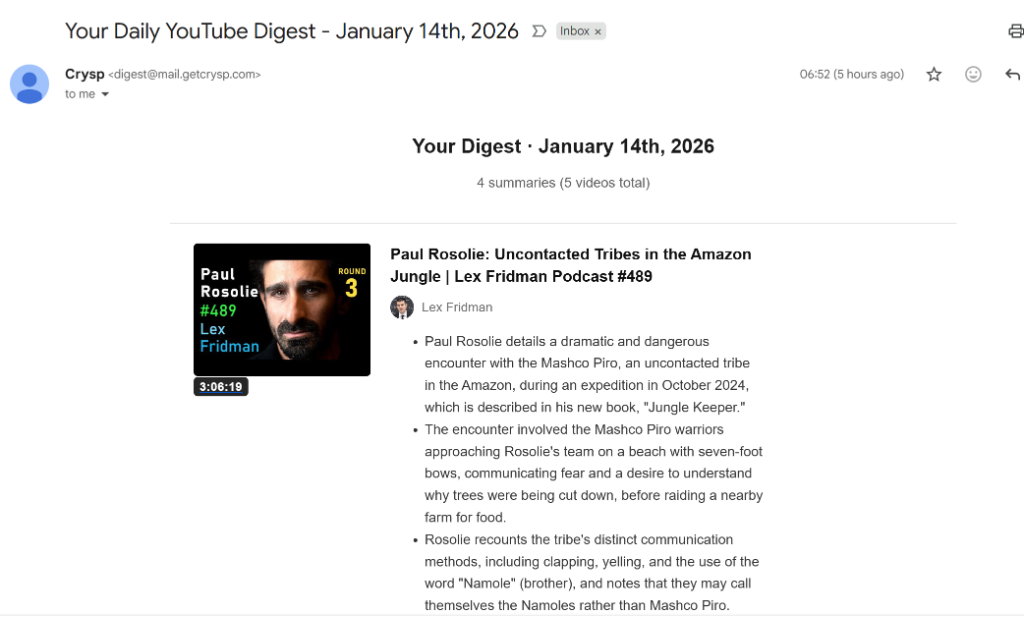
What it does: Sends you one email every morning with a short summary of each new video from the YouTube channels you pick.
Best for: Founders, builders and anyone who follows 10+ channels but can't watch everything.
Why TubeScout Stands Out
The problem: you follow 20 channels to learn from the best, and new videos pile up faster than you can watch. You miss the important ones or waste time on the ones that turn out to be irrelevant.
TubeScout fixes this by:
- Tracking the channels you pick and checking for new videos every day
- Summarizing each new video so you get the key points in about a minute
- Putting it all in one morning email, so you decide what to watch before you open YouTube
Pros
- 7 free digests, no credit card required. Only digests that actually contain new videos count.
- Quick setup: Search for channels by name, or import your YouTube subscriptions if you prefer. Connecting your YouTube account is optional.
- Summaries of every new video, so you know what's in it without watching
- Email delivery: Stay current without opening YouTube and its recommendations
- Works for any channel with captions: podcasts, business, tech, education
- Free extras: a YouTube summarizer and a transcript tool for single videos, no account needed
Cons
- Once a day, not real time. You get new videos the next morning, not the minute they're posted.
- Paid after the trial: Basic ($3/month, 20 channels), Pro ($7/month, 60 channels), Premium ($15/month, 150 channels). There's no permanent free plan for the email digest.
- Summaries aren't transcripts: If you need word-for-word text, use the transcript tool instead.
Who Should Use TubeScout
- Founders and indie hackers following startup channels (Y Combinator, Greg Isenberg, Alex Hormozi)
- Builders keeping up with AI channels (Fireship, Two Minute Papers, Latent Space)
- Knowledge workers learning from long podcasts (Lenny's Podcast, My First Million)
- Anyone subscribed to 10+ channels who feels behind on their feed
Pricing: 7 free digests, then Basic ($3/mo), Pro ($7/mo) or Premium ($15/mo)
Get started: Try 7 free digests →
Try the Free YouTube Summarizer
Get AI-powered summaries of any YouTube video in under 30 seconds. No signup required.
Summarize a Video NowTool #2: YouTube Studio (Best for Channel Analytics)
What it does: YouTube's official dashboard for creators to track views, watch time, audience and revenue.
Best for: Anyone who uploads videos and wants to know what's working.
Why It's Essential
If you publish on YouTube, Studio is non-negotiable. It's the only place to see:
- Views, watch time and subscriber changes, close to real time
- Traffic sources: where viewers find your videos (search, suggested, external)
- Audience retention: exactly where viewers drop off
- Revenue data if you're in the Partner Program
The mobile app is good enough to reply to comments and check numbers on the go.
Pros
- Completely free and built into YouTube
- Official data, not third-party estimates
- Mobile app for quick checks
- Comment management built in
Cons
- Lots of data, few recommendations, which can overwhelm new creators
- Limited keyword research, you'll want a separate tool for that
Who Should Use YouTube Studio
Every YouTuber. If you upload videos, this is your home base.
Pricing: Free (requires a YouTube channel)
Get started: YouTube Studio →
Tool #3: vidIQ (Best for Keyword Research and Video Ideas)
What it does: Research and optimization tools for YouTube creators: keyword ideas, trend tracking, and an AI coach that suggests what to make next.
Best for: Creators who want more views from search and suggested videos.
Why Creators Use vidIQ
vidIQ helps you pick topics and titles people actually search for. The free plan includes a monthly allowance of AI credits, niche trend tracking, content ideas and growth tips. Paid plans (Boost and Max) add more credits, deeper research and thumbnail tools.
Pros
- Useful free plan (150 AI credits a month when we checked in September 2026)
- Trend and idea research built around your niche
- Keyword and competitor insights to guide titles and topics
Cons
- The best research tools are paid
- Can be a lot for beginners, with many scores and suggestions to weigh
Who Should Use vidIQ
- Creators focused on search traffic (tutorials, how-tos, reviews)
- Smaller channels trying to grow without an existing audience
- Anyone learning how YouTube search works
Pricing: Free plan, paid Boost and Max plans
Get started: vidIQ →
Tool #4: Canva (Best for Thumbnail Design)
What it does: Drag-and-drop design tool with ready-made YouTube thumbnail templates.
Best for: Creators who need good-looking thumbnails without hiring a designer.
Why Thumbnails Matter
Your thumbnail is the first thing viewers see and often the only thing. A weak thumbnail means few clicks, however good the video is.
Canva makes decent thumbnails fast with:
- YouTube thumbnail templates at the right size (1280×720)
- Stock photos and graphics, many of them free
- Text styles and effects that stay readable at small sizes
- Saved templates so every thumbnail looks like it belongs to your channel
Pros
- Free plan covers most thumbnail work
- Easy to use, no design skills needed
- Reusable templates for a consistent look
- Fast: a thumbnail in 5 to 10 minutes
Cons
- Some assets are paid-only
- Can look generic if you use templates without changing them
- Not Photoshop, limited for advanced editing
Who Should Use Canva
Every YouTuber who doesn't have a designer. Even if you hire one later, it's handy for quick edits.
Pricing: Free plan, paid Pro and team plans
Get started: Canva →
Tool #5: Ask YouTube (Best for Questions About One Video)
What it does: YouTube's built-in AI feature on the watch page. You tap Ask under a video and ask questions about it, or pick a suggested prompt.
Best for: Viewers who want the gist of a single video they already have open.
Why It's Useful
For one video, it's the fastest option: no copy-pasting links, no extra tool. Ask what the video covers, whether it answers your question, or where a topic comes up.
Pros
- Free and built in, nothing to install
- Works inside the video you're watching
- Good for quick follow-up questions
Cons
- Only on some videos, and only in supported languages and regions
- One video at a time, it doesn't help you keep up with a whole feed
- You have to be on YouTube, with its recommendations and autoplay pulling at you
Who Should Use It
Anyone who already has a video open and wants to know if it's worth the full watch. To screen every new video from the channels you follow, TubeScout does that job without you opening YouTube.
Pricing: Free
Get started: How Ask works (YouTube Help) →
Comparison: Which Tool Should You Use?
| Tool | Best For | Free Tier | Key Strength | Limitation |
|---|---|---|---|---|
| TubeScout | Keeping up with channels you follow | 7 free digests, free single-video tools | One morning email with every new video summarized | Once a day, paid after the trial |
| YouTube Studio | Channel analytics | Free | Official data | Little keyword research |
| vidIQ | Keyword research, video ideas | Free plan with monthly AI credits | Search and trend research | Best tools are paid |
| Canva | Thumbnail design | Free plan | Good designs fast | Some assets are paid |
| Ask YouTube | Questions about one video | Free | Built into the watch page | Select videos, languages and regions |
How to Choose the Right Tool for Your Needs
If you mostly watch (you're not a creator):
Start with TubeScout for the channels you follow and use Ask YouTube for one-off videos. You don't need creator tools. You need a way to keep up without living on YouTube.
If you're a new YouTuber:
- YouTube Studio (analytics, required)
- Canva (thumbnails, non-negotiable)
- vidIQ (keyword research and video ideas)
If you're a growing channel:
All of the above, and consider a paid vidIQ plan once search traffic matters to you.
If you're a founder or builder:
- TubeScout to follow your industry's channels without losing hours
- YouTube Studio if you publish
- Canva for quick visuals, not just thumbnails
Frequently Asked Questions
Which YouTube tool is best for beginners?
For creators, start with YouTube Studio (analytics) and Canva (thumbnails). Both are free and essential. For viewers who follow a lot of channels, TubeScout's daily email summaries are the easiest way to stay current without spending hours on YouTube.
Are free YouTube tools really free, or is it a trial?
It depends on the tool. YouTube Studio and Ask YouTube are free. Canva and vidIQ have free plans with paid upgrades. TubeScout's summarizer and transcript tools are free with no account, and the daily email digest comes with 7 free digests, then paid plans start at $3/month.
Is TubeBuddy still free?
When we checked in September 2026, TubeBuddy's pricing page only listed paid plans (Pro, Legend and Enterprise), which is why it's no longer on this list. vidIQ still has a free plan and covers much of the same keyword research.
How do I get video summaries for free?
For a single video, use TubeScout's free YouTube Summarizer or YouTube's built-in Ask feature. For every new video from the channels you follow, TubeScout's email digest gives you 7 free digests before you pay, no credit card required.
Can these tools help me grow my YouTube channel faster?
Yes, but only if the content is good. vidIQ helps you pick topics people search for. Canva helps your thumbnails get clicked. YouTube Studio shows what's working. No tool replaces good videos and consistency.
What's the best YouTube tool for non-creators?
TubeScout. Most YouTube tools are built for creators managing a channel. If you're a viewer trying to stay informed without drowning in videos, TubeScout's daily email summaries are built for exactly that.
Marc Page
Founder, TubeScout
Building tools to help knowledge workers learn faster