The fastest way to summarize a YouTube video in 2026 is to paste its link into a summarizer like TubeScout's free YouTube Summarizer, which reads the transcript and gives you the key points in under a minute. YouTube's built-in Ask feature and Google Gemini can also summarize a single video. If you want summaries of every new video from channels you follow, use a daily digest instead of summarizing one link at a time.
Why Video Summarization Matters
If you follow more than a handful of YouTube channels, you know the problem: the subscription feed fills up faster than you can watch. A few channels that post long interviews or podcasts can add up to hours of video a day. Nobody with a job has time for that.
The math doesn't work:
- 20 new videos × 20 minutes = almost 7 hours to watch everything
- Reading a summary takes about a minute per video, so 20 minutes total
- That's hours back, every day you'd otherwise try to keep up
There's a second problem: YouTube's feed doesn't always show you what matters. You miss videos from creators you follow and get pulled into Shorts and recommendations instead. Reading summaries outside YouTube keeps you informed without the pull.
Who benefits most from summaries:
- Founders and indie hackers following startup and business channels
- Developers and AI builders keeping up with fast-moving AI channels
- Students and researchers following educational channels
- Professionals learning from long industry podcasts
The goal isn't to stop watching. It's to decide what's worth your time before you commit 20 or 60 minutes.
Method 1: Use a YouTube Summarizer Like TubeScout
The fastest way to summarize one video is a tool built for it. Here's how it works with TubeScout:
Step-by-Step Guide
Step 1: Copy the YouTube URL
Copy the link from:
- Your browser's address bar
- The "Share" button under the video
- Your subscription feed (right-click the video, copy link)
Step 2: Paste it into the TubeScout Summarizer
Go to TubeScout's free YouTube Summarizer and paste the URL. No account needed.
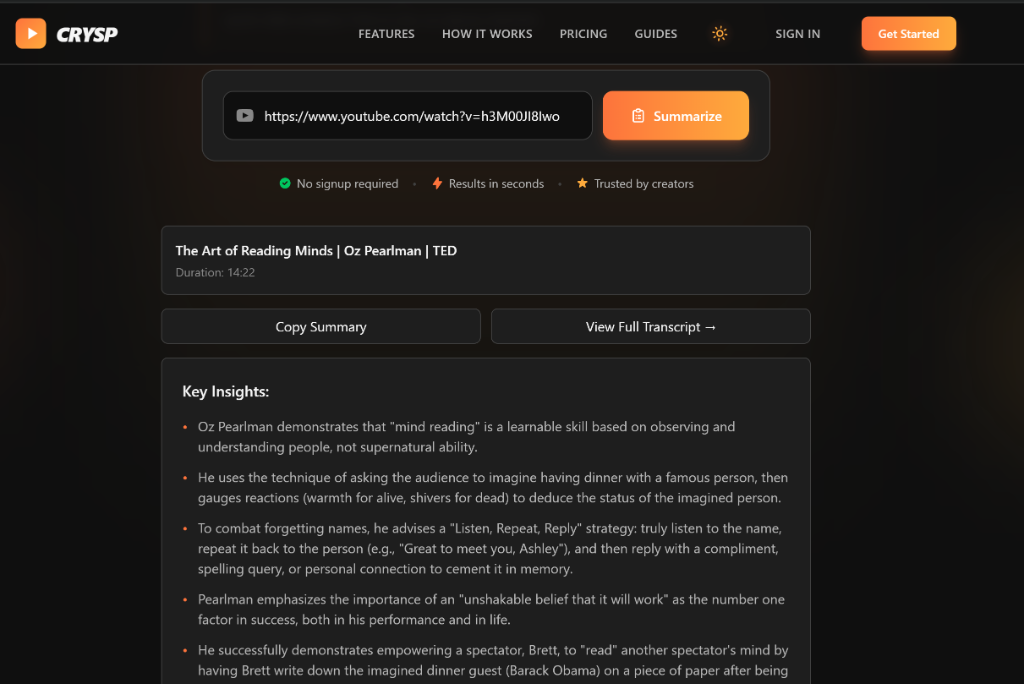
Step 3: Click Summarize
TubeScout fetches the video's transcript and turns it into a short summary grouped by topic. This usually takes a few seconds, a bit longer for long podcasts.
Step 4: Read the summary
You get the main topics and the key points under each one. A minute of reading tells you whether the full video is worth it.
Where TubeScout Is Different
- Free, no signup for single videos
- Built for YouTube: paste a link, nothing else to set up
- Daily email digests: if you like the summaries, get them for every new video from the channels you follow, delivered each morning
Best for: Quick screening decisions and anyone following several channels
Try the Free YouTube Summarizer
Get AI-powered summaries of any YouTube video in under 30 seconds. No signup required.
Summarize a Video NowMethod 2: Ask YouTube (Built Into the Watch Page)
YouTube has its own AI feature on the watch page. Under supported videos you'll see an Ask button: tap it and ask what the video covers, or pick one of the suggested prompts.
Pros:
- Free and built in, nothing to install
- Good for follow-up questions about the video you're watching
Cons:
- Only on some videos, in supported languages and regions
- One video at a time, while you're on YouTube with its recommendations and autoplay
Best for: Checking a video you already have open. See YouTube's help page on Ask for current availability.
Method 3: Google Gemini, or a Transcript + Any AI Chat
Gemini: Google's Gemini app can look up YouTube videos and answer questions about them. Paste the link and ask for a summary.
Any AI chat (ChatGPT, Claude and others): Not every chatbot can open YouTube links reliably, so the dependable route is to paste the transcript.
How to Get a YouTube Transcript
- Open the video on YouTube
- Expand the description under the video
- Click "Show transcript"
- Turn off timestamps in the transcript panel if you don't need them
- Select and copy the text
Or skip the clicking and use TubeScout's free YouTube Transcript tool, which gives you the full transcript to copy or download.
Prompting the AI
Paste the transcript with a prompt like:
"Summarize this YouTube video transcript. Include: main topics, key insights, and 3 actionable takeaways. Keep it under 200 words."
Pros:
- Free if you already use one of these tools
- Flexible: ask for exactly the format you want
- Easy to ask follow-up questions
Cons:
- A few minutes per video, and manual every time
- Some videos have no transcript
- Long transcripts can hit the chat's length limits
Best for: Custom formats, deeper follow-up questions, or when you already pay for an AI chat
Method 4: Watch at 2x Speed and Take Notes
The traditional method: just watch faster.
When This Makes Sense
- Deep learning content where you need the full context
- Entertainment, where the experience is the point
- Visual content that doesn't come through in text
- You've already decided to watch it
Practical Tips
- Use 2x playback speed (settings gear under the video)
- Take notes in a separate doc
- Use keyboard shortcuts: J (back 10s), L (forward 10s), K (pause)
- Use chapter markers to skip what you don't need
Why It's Slow for Screening
Even at 2x, a 20-minute video takes 10 minutes. If you're screening 20 videos to find the 3 worth watching, that's over 3 hours versus 20 minutes of reading summaries.
Best for: Videos you've already decided to watch, visual content, deep technical material
Method 5: Summaries of Every New Video, Automatically
Methods 1 to 4 all start with you finding a video. If your real problem is keeping up with channels you follow, summarizing link by link doesn't scale.
A daily digest flips it around: you pick the channels once, and every new video gets summarized for you. With TubeScout that's one email each morning, one short summary per new video. You read the email, then open only the videos worth your time.
Best for: Anyone following 10+ channels. Try it with 7 free digests →
Comparison: Which Method Should You Use?
| Method | Time per video | Cost | Best for |
|---|---|---|---|
| TubeScout Summarizer | Under a minute | Free | Quick screening of one video |
| Ask YouTube | Under a minute | Free | Questions about a video you have open |
| Gemini, or transcript + AI chat | 1 to 3 minutes | Free or paid plan | Custom formats, follow-up questions |
| 2x speed + notes | Half the video length | Free | Videos you'll definitely watch |
| TubeScout daily digest | None, it arrives by email | 7 free digests, then from $3/month | Keeping up with channels you follow |
My Recommendation
Read a summary before you watch almost anything. It's the fastest way to stay current without drowning in video. Use a single-video summarizer for links people send you, a daily digest for the channels you follow, and save full watching for:
- Videos you've already decided to watch
- Content that needs your full attention
- Visual content that doesn't translate to text
Frequently Asked Questions
Can you summarize any YouTube video?
Most videos with captions or an auto-generated transcript can be summarized. Videos without any transcript, like music-only content, can't.
How accurate are video summaries?
A good summary captures the main arguments and takeaways of a video, which is usually enough to decide whether it's worth your time. It's a first pass, not a replacement: if a summary surfaces something directly relevant to you, that's your signal to watch the full video.
Is the YouTube summarizer free to use?
Yes. TubeScout's YouTube Summarizer is free and works without an account. For summaries of every new video from the channels you follow, the daily email digest comes with 7 free digests before you pay.
Do summaries work for long YouTube videos?
Yes, from short clips to multi-hour podcasts. Long videos take a little longer to process, and they're where a summary saves the most time.
Can I get summaries of new videos automatically?
Yes. Instead of pasting links one by one, pick the channels you follow in TubeScout and you'll get one email every morning with a short summary of each new video. Your first 7 digests are free, no credit card required.
Marc Page
Founder, TubeScout
Building tools to help knowledge workers learn faster